Moving UniFi Network to a Cloud Gateway
I replaced my self-hosted UniFi Network controller with a Cloud Gateway Ultra. I mainly wanted to keep my existing Wi-Fi configuration and move the already adopted devices without having to reset everything.
I created a Network backup (.unf) on the old controller and restored only the Network application on the Cloud Gateway. That brought over the configuration, but the access points were still talking to the old controller.
Restoring the configuration does not tell existing devices that their controller has moved.
Inform Host Override
On the old controller, there is an Inform Host Override setting under:
Devices → Device Updates and Settings → Device Settings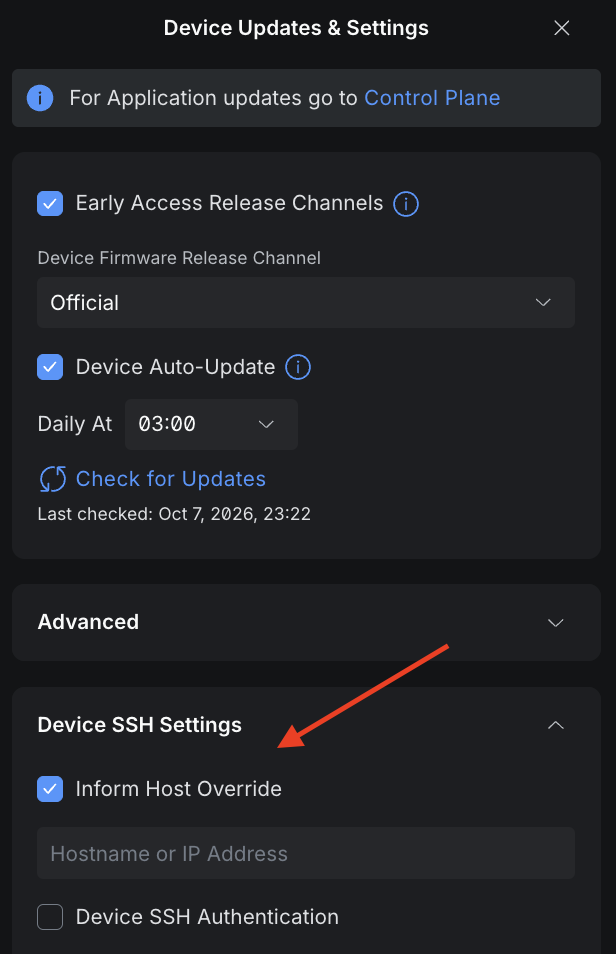
I enabled it and set it to the IP address of the new Cloud Gateway.
This changes the address the controller advertises to its adopted devices as the address they should use to inform the controller. In other words, the old controller tells the devices where their new controller lives.
After changing this, both access points appeared online on the Cloud Gateway almost immediately. No factory reset or manual adoption was necessary.
A Switch Stuck Between Two Controllers
I did manage to make things more complicated for my switch.
Before restoring the old Network backup, I had already adopted the switch on the Cloud Gateway. The restore then brought back the old controller’s record of that same switch. That left it in a weird state where neither controller seemed to have a healthy connection to it.
I factory reset the switch, but that alone was not enough. The Cloud Gateway still had the stale device record and kept showing it as disconnected.
What finally fixed it was:
factory reset switch
→ remove the existing switch from the Cloud Gateway
→ wait for it to appear as a new device
→ adopt
Once I removed the old record, the reset switch appeared for adoption and came online within seconds.
The useful lesson: a factory reset only resets the device itself. If a UniFi device gets stuck during a controller migration, you may also need to remove its stale record from the controller before it can be discovered and adopted cleanly.